
Screenshots that sell. Automatically.
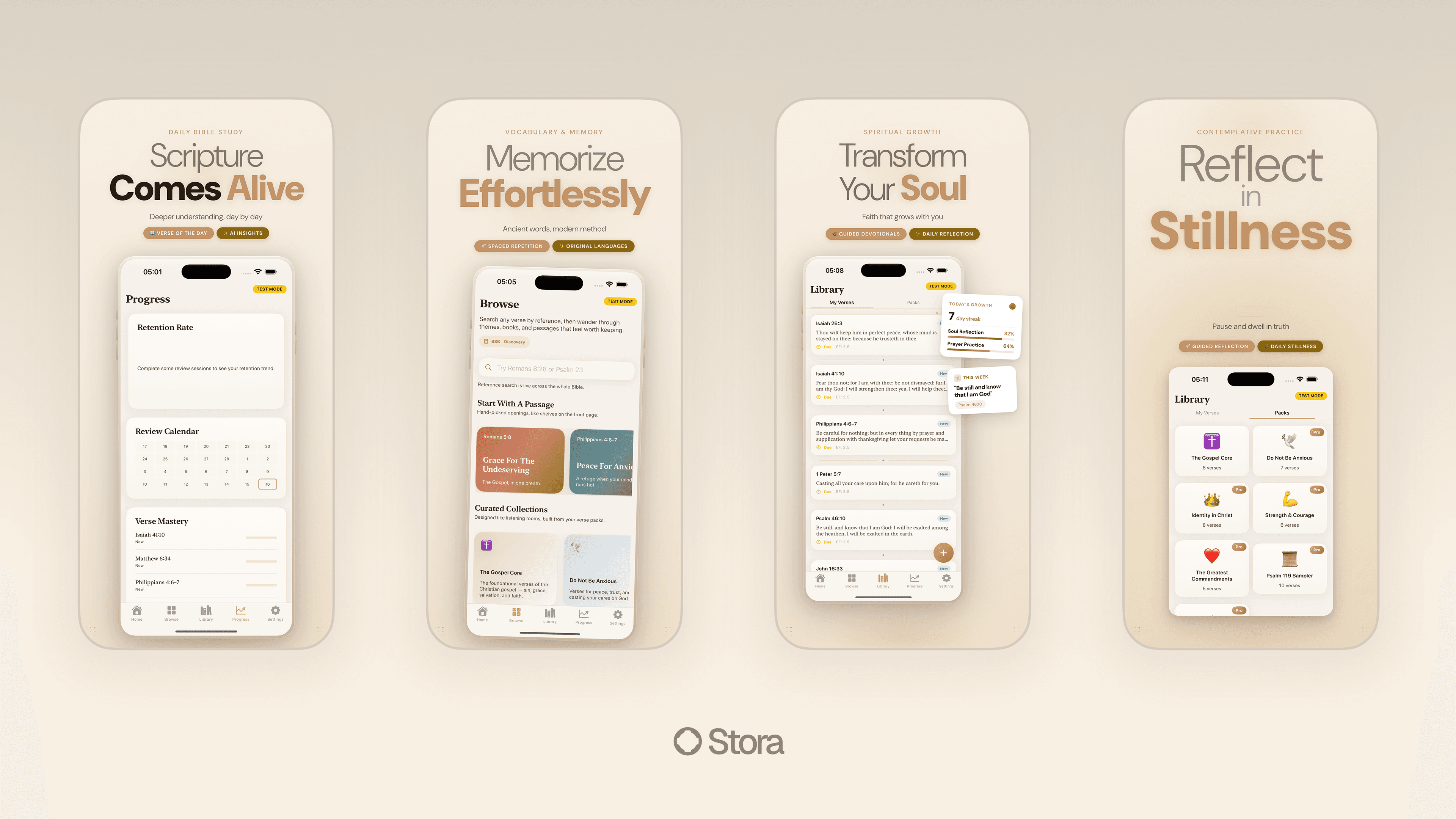
Stora's AI agent runs your app on real simulators, captures every screen, and generates store-ready designs. All done in under 10 minutes.
Everything you need. Nothing you don't.
AI-powered capture
An AI agent launches your app on cloud simulators, navigates every flow, and captures high-value screens. No manual setup required.
Auto design
Generates professional store layouts with device frames, headlines, and backgrounds. Learns from top apps in your category.
Multi-device
All required App Store and Google Play sizes generated automatically. iPhone, iPad, Android phones and tablets, all covered.
One-click publish
Push screenshots directly to App Store Connect and Google Play Console. No more downloading and re-uploading.
From "I need screenshots" to uploaded in under an hour.
- 01
Connect your app
Either connect a GitHub repo (we build it) or upload an .ipa / .apk (we install it). Either way, no device lab on your end.
- 02
Agent walks the app
A capture agent launches on every required device and locale, navigates the flows you marked as hero, and captures at the right breakpoints.
- 03
Design pass
A design agent wraps each capture in the right device frame, picks a headline tone from your ASO voice, and lays out the store listing.
- 04
Review and ship
Approve, tweak headlines, or regenerate any frame. Push straight to App Store Connect and Play Console from the same screen.
Stop sharing Figma mockups pretending to be screenshots.
Apple's screenshot guidelines tightened in late 2024: screens must depict the app actually running, not mockups. The reviewer checks a sample of yours against an installed copy. If the UI in your screenshots doesn't exist in your app, you're rejected. This is why template-based tools like AppScreens and Screenshot Pro are getting rejected more frequently — their designs were never the problem, their lack of real capture was.
Stora captures from a real simulator running your real binary. Every pixel the reviewer sees in your screenshot exists in a working screen of your app. If you change a button color, the next run reflects it. If you add a new locale, the next run captures it. There's no drift between what's in your screenshots and what's in the App Store build.
The design agent is trained on the top 50 apps in your category. It picks device frame styles, headline placement, and background palettes that match what's currently converting in your niche. You can override every choice, but defaults that already work save the Saturday-afternoon design debate.
Whose screenshots get substantially better.
Frequently asked.
- Does this work for React Native / Expo / Flutter apps?
- Yes — we run the app on a real simulator, so the framework doesn't matter. We've validated the pipeline against React Native, Expo (managed + bare), Flutter, SwiftUI, UIKit, Jetpack Compose, and Kotlin Multiplatform.
- What if I need custom headlines per screenshot?
- The design agent generates defaults; you can override any headline, regenerate that screen only, or import a CSV of pre-written copy. Non-English locales are auto-translated from your English copy via the ASO agent.
- Can I preview before spending a run?
- Yes — you can run the capture agent in preview mode, which runs a single device / single locale / single flow for free. You commit a run only when you're ready for the full matrix.
- Do you handle Vision Pro / Apple Watch / CarPlay screenshots?
- Vision Pro and Apple Watch: yes, on the Launch plan. CarPlay: the framework isn't simulator-friendly, so we render using your provided storyboards + a design template. Tesla / Android Auto: not yet supported.
See how Stora compares.
| Feature | Stora | AppScreens | Screenshot Pro | Hotpot.ai |
|---|---|---|---|---|
| AI capture | ||||
| Auto design | ||||
| Real device capture | ||||
| Multi-locale | ||||
| Direct store publish | ||||
| Starting price | $0/mo | $6.67/mo | $10/mo | $10/mo |
Ready to ship?
Connect your GitHub repo and let agents handle the rest. Your next release, out the door in minutes.